
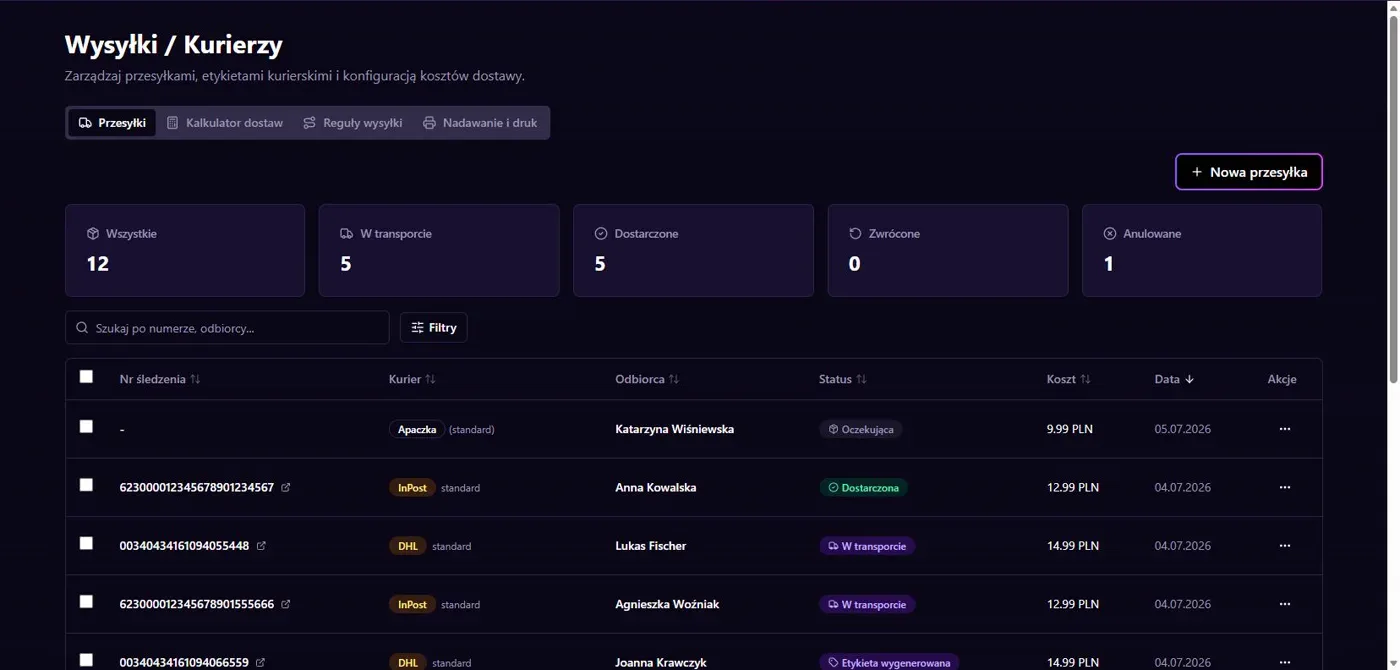
Courier integrations: labels and parcel tracking in one panel
Ship with InPost, DPD, DHL, GLS, ORLEN Paczka, Poczta Polska or brokers such as Apaczka and Furgonetka. Shipping rules pick the carrier for each order, and the status goes back to the customer.
Carriers
Supported carriers
Most carriers have their own page describing the scope and limitations.
InPost
Parcel lockers and courier via the ShipX API.
DPD
Domestic courier, labels and tracking. Cancelling shipments is not supported yet.
DHL
Domestic shipments, labels and statuses.
GLS
Labels and tracking for GLS Poland shipments.
ORLEN Paczka
Parcel lockers and pickup points.
Poczta Polska
Pocztex and postal parcels, shipped via e-Nadawca.
Allegro Delivery
Labels in the Wysyłam z Allegro program, or your own carrier's tracking number on the order.
Apaczka
Broker: InPost, DPD, DHL, GLS, ORLEN and Poczta Polska from one account.
Furgonetka
Broker: DPD, InPost, DHL, GLS, UPS, FedEx, ORLEN Paczka and Poczta Polska from one account.
Ambro Express
Furniture, pallets and bulky items, also with carry-in and assembly.
Polkurier
Broker: DPD, UPS, InPost, GLS, Kurier 48 and Pocztex from one account.
Base Courier (BLPaczka)
Domestic shipments, quotes, labels, statuses and pickup points.
DPD Deutschland
A parcel to an address in Germany, label and tracking number.
GLS Germany
A parcel to an address in Germany, label and tracking, via ShipIT or the Web API.
MenedżerWysyłek.pl
Shipping services for your account, set up individually.








The brokers Apaczka and Furgonetka give access to several carriers from one account. Each of them has its own integration page.
Setup
Shipping in three steps
We help with every step, including during the trial.
Connect a carrier
You add an InPost, DPD, DHL or other carrier account. You can connect several.
Set shipping rules
A rule picks the carrier by delivery method, sales channel and priority.
Print labels
One at a time or in bulk, straight from the order list.
Connections
Carrier and sales channel
The most popular setups with a store or a marketplace.


FAQ
Questions about shipping
Can I use several carriers at the same time?
Yes. Shipping rules pick the carrier for each order based on the delivery method chosen by the buyer and the sales channel. When several rules match, priority decides.
Can I create labels in bulk?
Yes. You create labels one at a time or in bulk, for many orders at once, straight from the order list.
How does parcel tracking work?
NavyFlame fetches the shipment status from the carrier and updates the order. With notifications turned on, the buyer gets an e-mail with the number and a tracking link.
Which carriers are supported?
Among others InPost, DPD, DHL, GLS, ORLEN Paczka and Poczta Polska, plus Allegro Delivery for Allegro orders. Through the Apaczka and Furgonetka brokers you can ship with further carriers from one account. The full list, with the status of each integration, is further up this page.
Do you support InPost parcel lockers?
Yes. The parcel locker the buyer chose goes into the shipment automatically, and you generate locker labels in the panel, one at a time or in bulk.
Connect a carrier and send your first parcel
28 days of the full version, no card needed. We help with the connection and the rules.
- No payment card
- Onboarding help included
- Cancel whenever you want